
Modules
Storage
The Storage page checks your app's upload disk, for example S3, with a real test file.
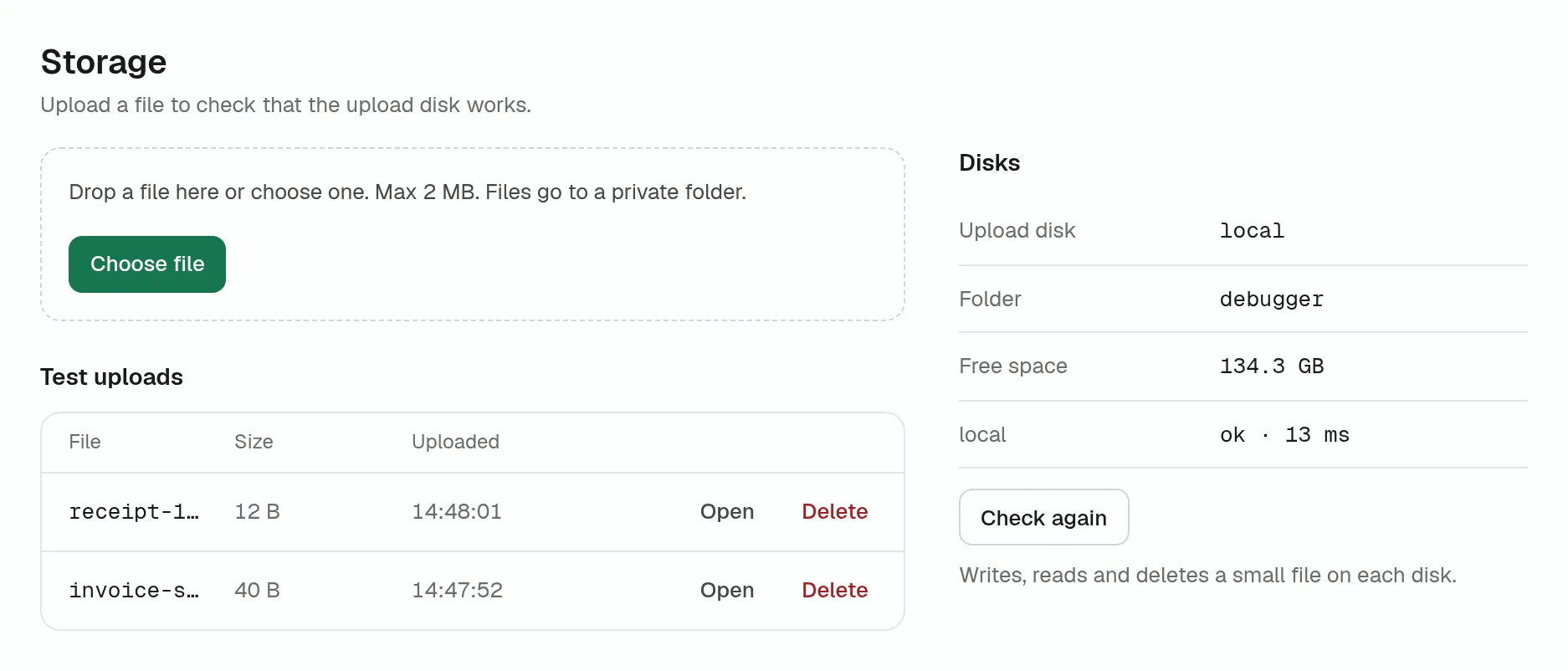
Uploading a test file
Drop a file on the upload area or press Choose file. The file is stored in the storage.folder folder on the storage.disk disk, with private visibility.
Uploaded files show under Test uploads, with their size and upload time:
- Open: opens the file in a new tab.
- Delete: removes the file from the disk. It asks you to confirm first.
Checking disks
Press Check disks to write, read back, and delete a small file on the upload disk and the local disk. The result is ok with how long it took, or failed with the disk's error message.
Related config
storage.disk: the disk for test uploads, set withDEBUGGER_STORAGE_DISK. The default islocal.storage.folder: the default isdebugger.storage.max_kb: the default is51200(50 MB), or PHP'supload_max_filesizeif that is smaller.
DEBUGGER_STORAGE_DISK=s3Security
- Only files in the test folder can be opened or deleted.
- Images, PDFs, video, audio, and text open in the browser with a fixed file type. An HTML file renamed to
.txtstill shows as plain text. - Other file types are always downloaded.
- An opened file can't run scripts or reach your app.
Read-only mode
Upload, Delete, and Check disks are turned off. The file list and the Open button still work.
Limits
- The free space shown is the free space on the app server, not on an upload disk like S3.