
Modules
Connections
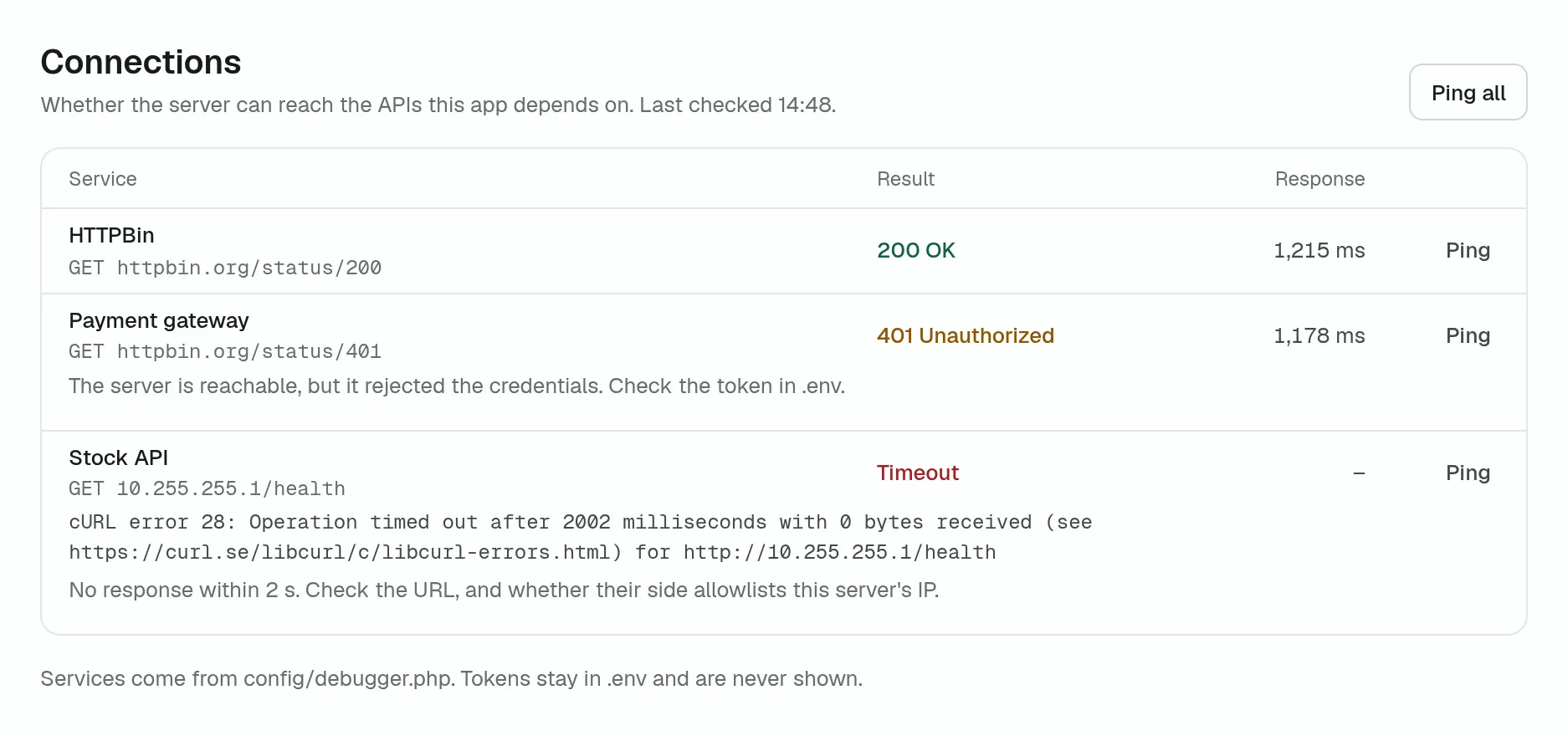
The Connections page checks whether the external APIs your app uses can be reached from the server, and whether they accept the credentials.
Adding an API
List the APIs in config/debugger.php. Tokens stay in .env.
'connections' => [
    'payment' => [
        'name' => 'Payment API',
        'url' => 'https://api.example.com/v1/ping',
        'method' => 'GET',
        'headers' => ['Authorization' => 'Bearer '.env('PAYMENT_API_KEY')],
        'timeout' => 5,
    ],
],url: required.name: the display name. If empty, it is made from the key.method: the default isGET.headers: optional.body: optional, sent as JSON.timeout: in seconds. The default is5.
Actions
- Ping: sends one request to that API.
- Ping all: pings every API.
The result:
- Green, for example
200 OK: the API answered. - Yellow,
401or403: the API can be reached, but it rejected the credentials. - Red: any other error,
Timeout, orUnreachable.
For a result that isn't green, the error message and a hint about what to check show under the row. The last result of each API is kept in the cache and used on the Overview.
Read-only mode
Ping and Ping all are turned off. The last results stay visible.
Limits
- Ping really sends a request. Pick an endpoint that is safe to call again and again, like a status or ping endpoint.
- Headers are never shown, but the URL is shown in full. Put tokens in a header, not in the URL's query string.